Research Poster Maker
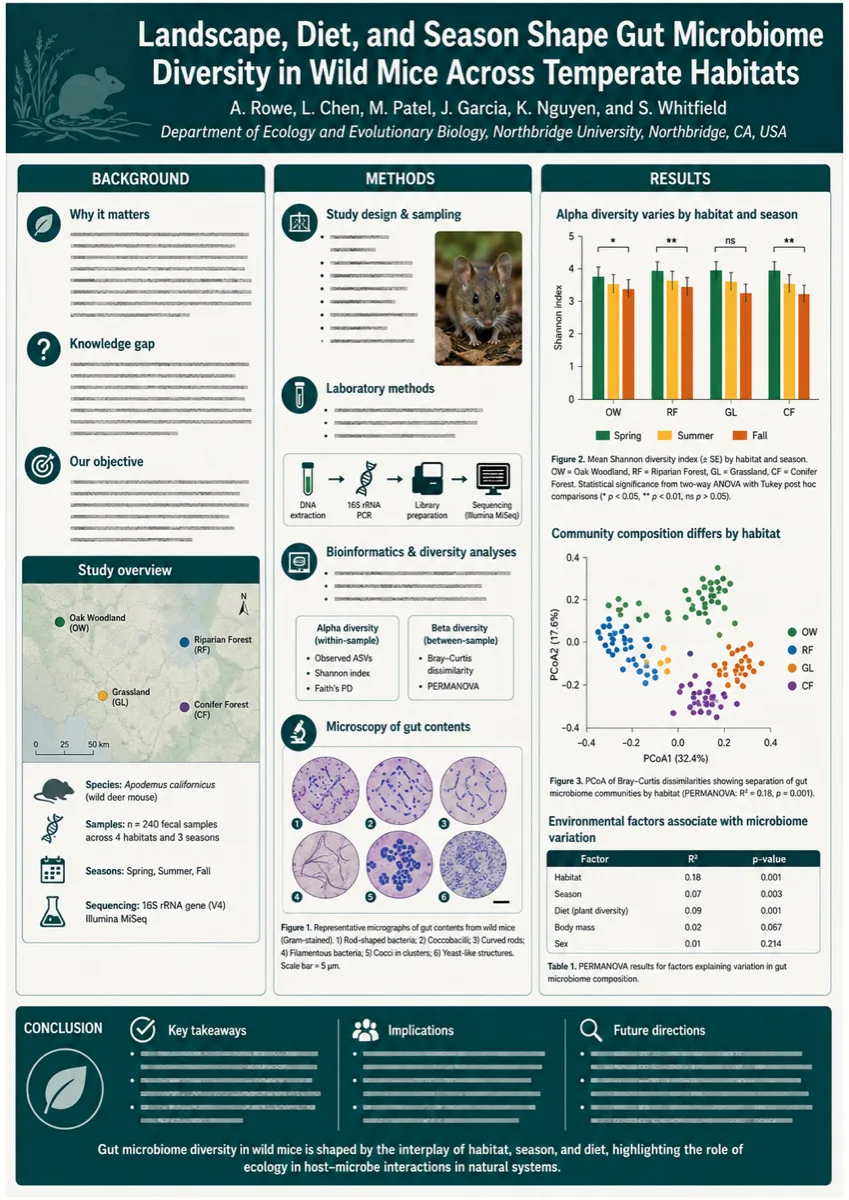
The research poster maker lays out a conference board from the text of your study — title, background, methods, results, conclusion — at A0, A1 or 36 × 48 in. It composes the layout; every number on it stays yours to check.
Posters Built With This Research Poster Maker
Four boards, four fields, each with the prompt behind it. Swap in your study and the research poster maker rebuilds the layout.
What Is a Research Poster Maker?
A research poster maker turns the written parts of a study — title, authors, background, methods, results, conclusion — into one large board sized for a conference stand. Depending on the field the same tool gets called a scientific poster maker, an academic poster maker or a conference poster maker. The PosterMont research poster maker builds the board from a prompt and exports it at the size the call for abstracts asked for: A0, A1, 24 × 36 in or 36 × 48 in, as PDF, PNG or JPG at up to 300 DPI. It is a layout tool, not a data tool — every number stays yours to check.
What This Research Poster Maker Handles
Four things separate a conference board from a large picture, and the research poster maker settles each.
The Board Shape Comes First
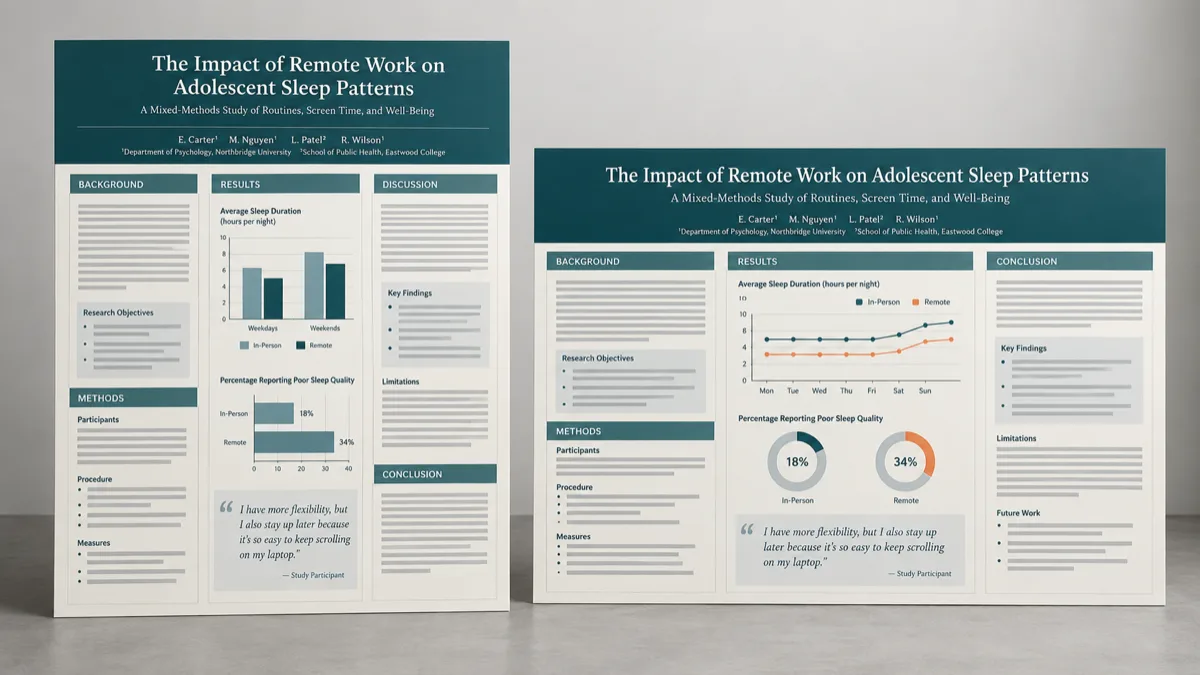
Poster trouble starts with a canvas that was never the right shape. Pick the ratio first — 3:4 for an A-series portrait board, 4:3 for the 48 × 36 in stand most North American meetings use — and the research poster maker composes inside it.
Sections a Reviewer Expects
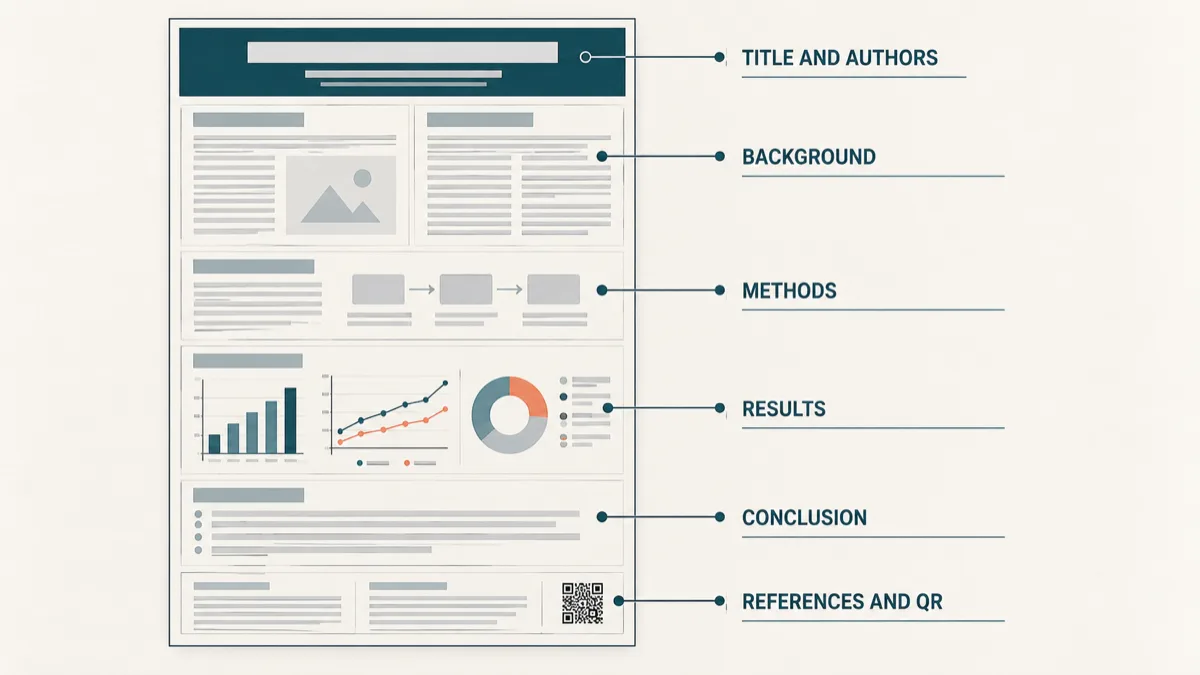
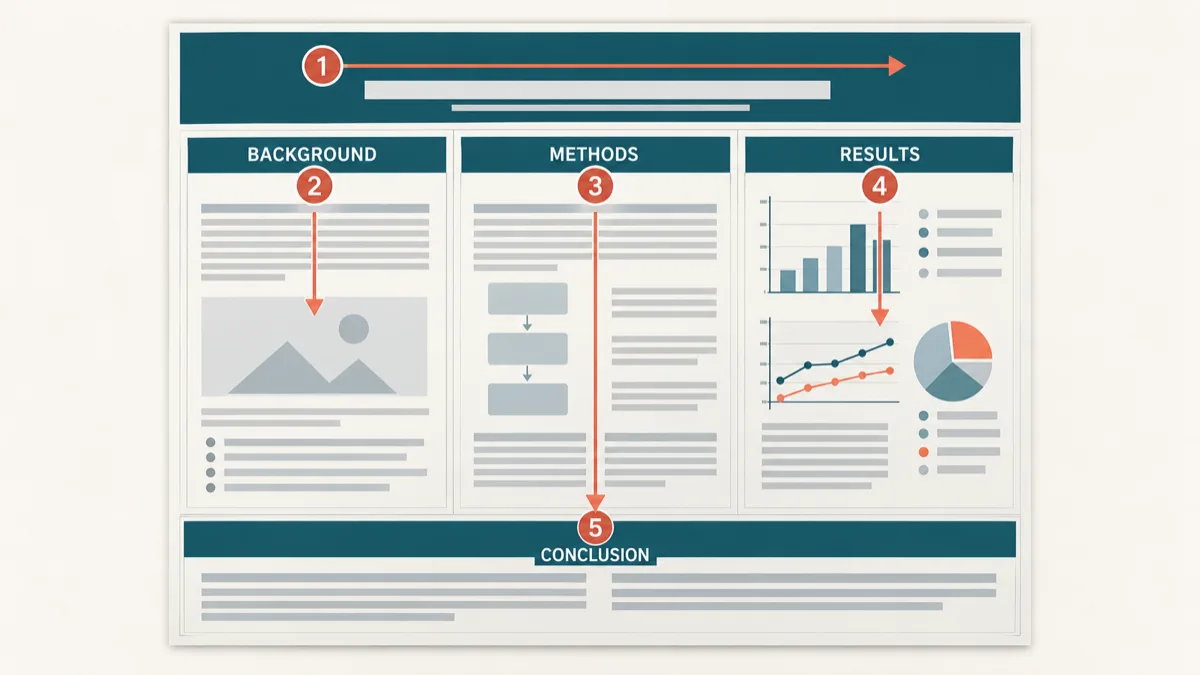
Describe the study in the order a scientific poster is read and the layout follows: title and authors on top, then background, methods, results and conclusion in columns. Ask for a limitations box and the research poster maker leaves room.
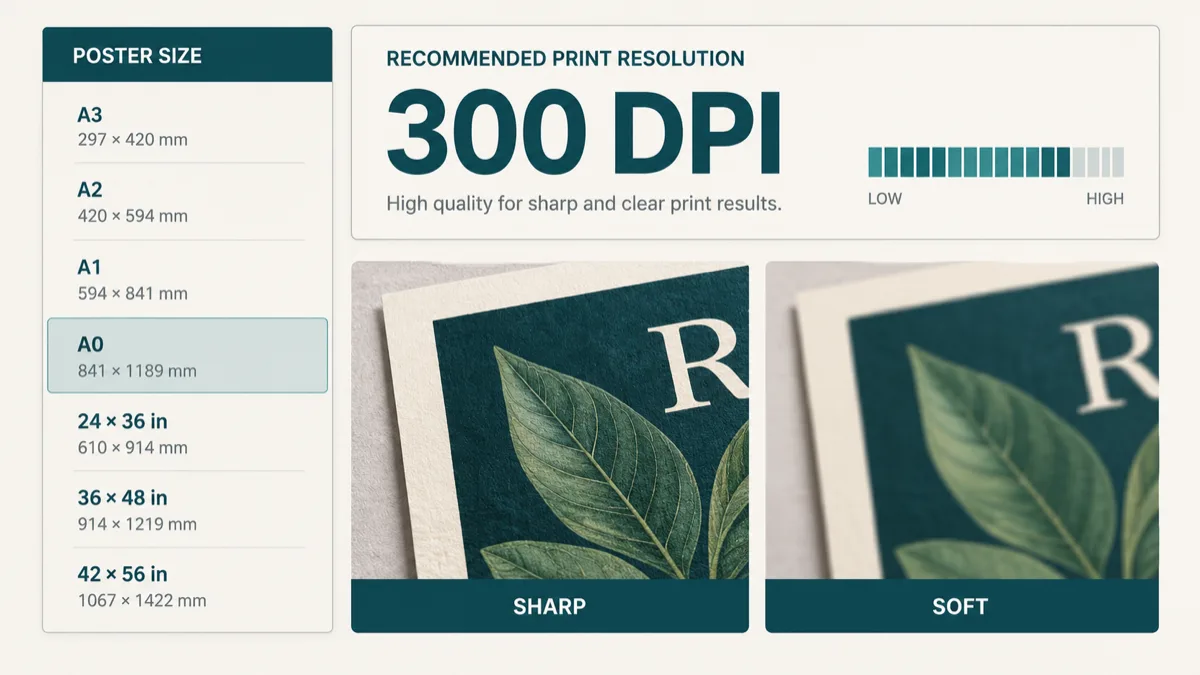
A DPI Readout From the Real Pixels
Pick a print size and the research poster maker reports what those pixels genuinely give at it. A 2048 px image is never upscaled into a 300 DPI A0.
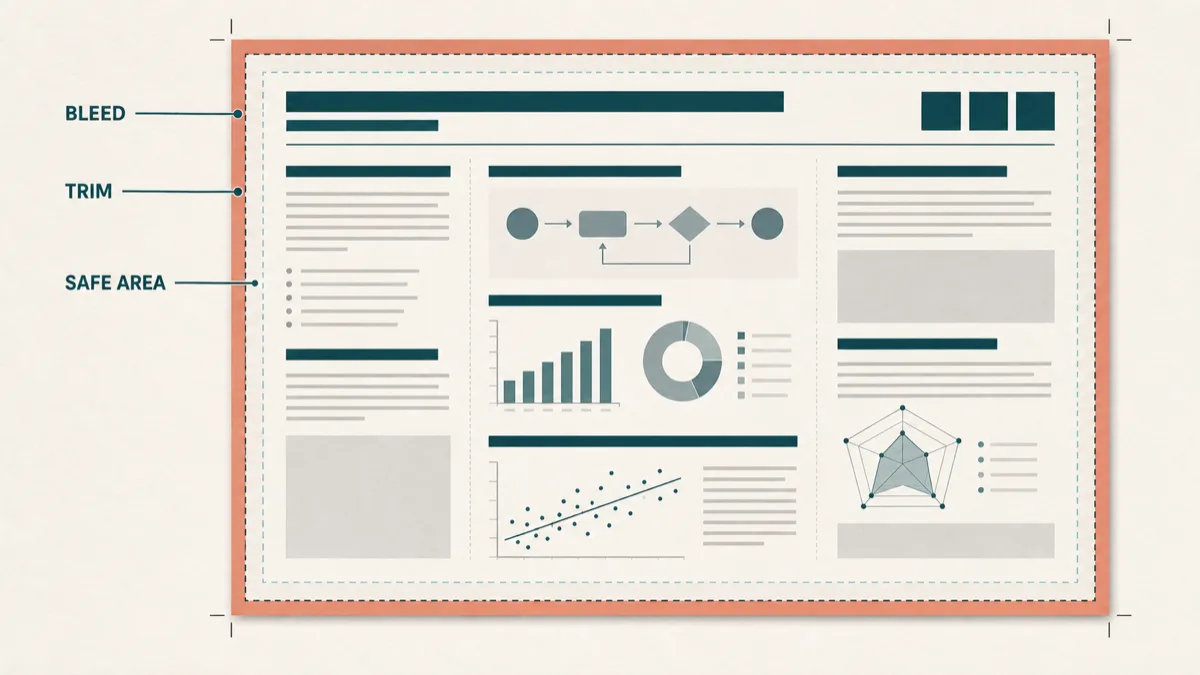
A Print File With Bleed and a Trim Box
Export as PDF, PNG or JPG at up to 300 DPI with an optional 3 mm bleed. The PDF carries a trim box and a bleed box, which is what a print shop looks for.
What Goes on a Scientific Poster
Six blocks, in the order a passer-by reads them. Name the ones you need and the research poster maker reserves the space.
Title, Authors, Affiliation
Read from across the hall. Give the research poster maker one line of plain language, not the full paper title.
Background
Why the question matters, in two or three sentences. Too much text is what sinks a poster.
Methods
Enough detail that someone can ask a sharper question. A small schematic beats a paragraph.
Results
The reason the board exists, and the block the research poster maker should give the most room.
Conclusion
The sentence you want repeated back to you. Put it where the eye lands last.
References and QR
A short reference strip in small type, plus room for a QR code to the preprint.
How to Make a Research Poster in Three Steps
From an abstract you already have to a file a print shop accepts.
- 01
Describe the Study and the Board
Paste the substance — what you asked, what you did, what you found — then say how it should sit: how many columns, which section carries the figure. Naming the field helps the research poster maker pick the right register.
- 02
Set the Ratio, Then Generate
Choose 3:4 for an A-series board or 4:3 for a 36 × 48 in stand, then run the research poster maker. Change one instruction at a time.
- 03
Export at the Conference Size
Open the research poster maker's print export, pick A0, A1, 24 × 36 in or 36 × 48 in, read the DPI figure, and turn on 3 mm bleed if the printer trims.
Who Uses a Research Poster Maker
Six people reaching for a research poster maker at different points in the same deadline.
A First Poster Session
First-time presenters
The abstract was accepted months ago and the board is due Friday. The research poster maker puts a whole layout on screen in one run.
Undergraduate Research Day
Undergraduates
One study, one afternoon, a 24 × 36 in board and a campus printer with a queue. The research poster maker leaves the time for checking figures.
A Case Report or Audit Board
Residents and clinicians
Clinical meetings want restraint in an academic poster: outcomes table, one curve, clear conclusion. Ask for it and the research poster maker keeps to it.
The Same Study, a New Meeting
Lab leads
A board that ran at A0 in Europe needs to be 48 × 36 in landscape in the States. Regenerate at the new ratio rather than stretching last year's file.
Poster Assignments
Course instructors
A worked example shows the structure of a scientific poster in a way a rubric does not.
A Draft the Group Can Argue With
Multi-author groups
Circulating a real layout gets sharper feedback than circulating a document. Change the prompt and run the research poster maker again.
Before You Send the Board to a Printer
Three checks that decide whether a research poster maker file survives a large-format printer.
Trust the DPI Readout, Not the File Size
A file can be enormous and still be thin at A0. The research poster maker reports what your pixels give at the size you picked, because nothing is upscaled.
Turn On Bleed if the Shop Trims
Ask whether the conference poster is printed to size or cut from a larger sheet. If it is trimmed, the research poster maker exports with 3 mm bleed and the cut lands where you expect.
Read It at the Distance It Will Be Read
Print one A4 proof and hold it at arm's length: roughly an A0 board seen from two metres. Anything you lean into is too small.
Conference Poster Sizes Meetings Actually Ask For
Set the ratio before the run, then export at the physical size in the call for abstracts. Every size below is a preset in the research poster maker.
| Where it is going | Size to export |
|---|---|
| North American conference board, landscape | Poster · 36 × 48 in |
| International and European boards, portrait | A0 · 841 × 1189 mm |
| Narrow or shared stand | A1 · 594 × 841 mm |
| Departmental symposium | Poster · 24 × 36 in |
| Undergraduate research day | Poster · 18 × 24 in |
| Handout version of the board | A4 · 210 × 297 mm or US Letter |
The research poster maker prints every size portrait or landscape as PDF, PNG or JPG at up to 300 DPI. Files are RGB, so a shop asking for CMYK will convert them.
Research Poster Maker vs. PowerPoint, Canva and General AI Tools
Four ways people end up holding a conference poster, and what each costs next to a research poster maker.
| Route | What it costs you |
|---|---|
| A PowerPoint slide resized to 48 × 36 in | Free and familiar, still the most common route. You set the page size and every text box yourself, and font sizes shift with the canvas. |
| A general design tool | Good templates and real editing control, aimed at marketing formats. The academic section order and the print settings stay your job. |
| A general AI image tool | A picture, not a board: no fixed print size, no bleed or trim box, and long passages of text tend to break down. |
| A research poster maker | One research poster maker run gives a full academic layout at the conference ratio, with an export that reports its true DPI. You bring the study and check every number. |
A research poster maker is fastest when the content already exists and the deadline does not.
Research Poster Maker FAQ
Is this research poster maker free to use?
What poster sizes does the research poster maker support?
Can I trust the charts and figures it draws?
Is it acceptable to use AI for an academic conference poster?
What file formats and resolution can I export?
Will my poster actually print at 300 DPI?
Can I edit the poster after it is generated?
Do I need design software or design skills?
Should my poster be portrait or landscape?
Can I upload my manuscript or a PDF?
How much does it cost to print a research poster?
What if my results are not ready yet?
Your Board Is Due Before the Meeting Is
Paste the abstract, pick the size the conference asked for, and the research poster maker hands back a print-ready file with an honest DPI readout.