AI Movie Poster Generator
Create cinematic movie posters with our AI movie poster generator. Turn text or photos into custom movie posters for horror, action, animation and more.
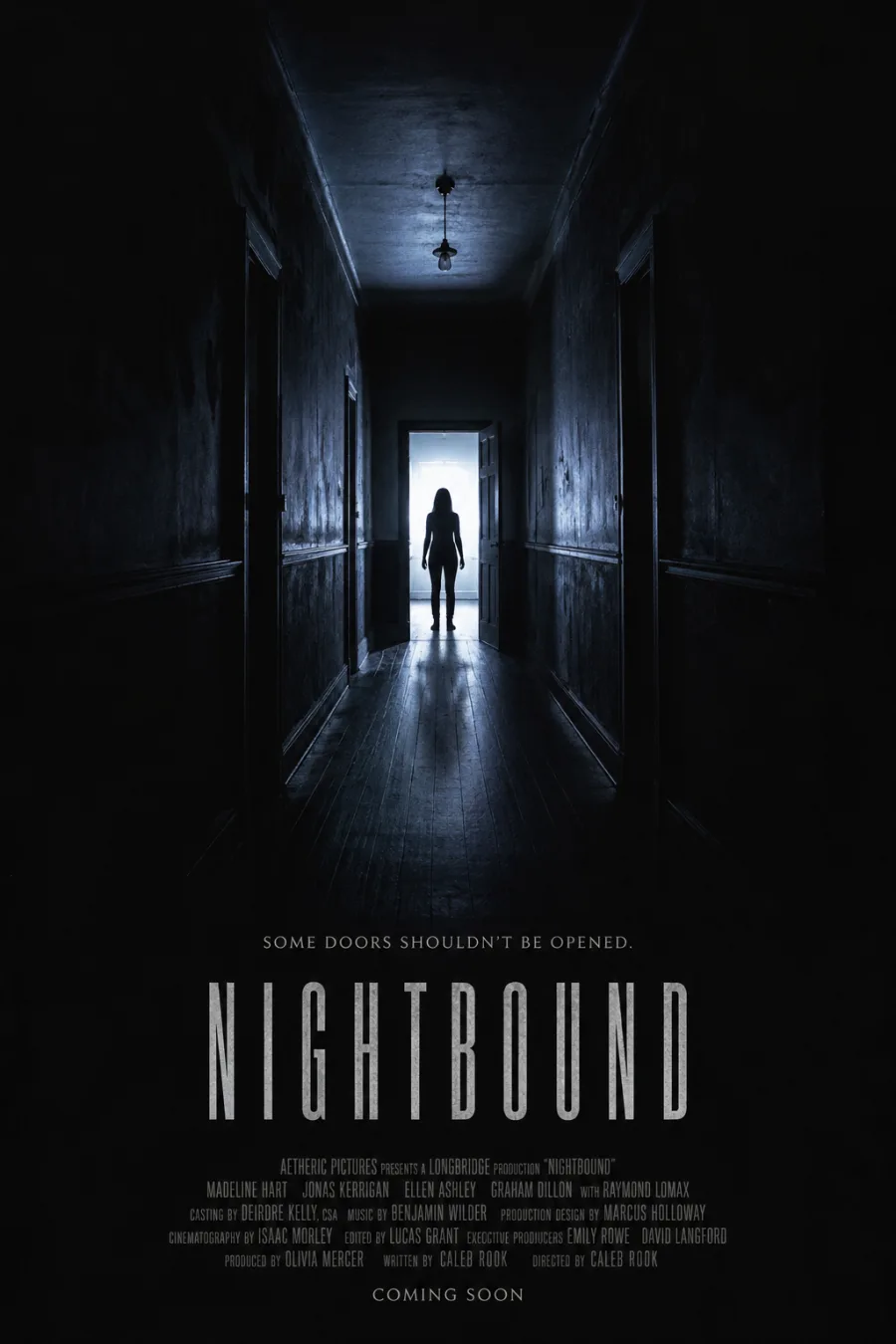
Examples and Styles from an AI Movie Poster Generator
Start with a working movie poster generator AI prompt, swap the title and cast, and make a custom one-sheet in the style you want. Every poster here came from the prompt printed below it.
What Is an AI Movie Poster Generator?
Use the AI movie poster generator from text to turn a title, logline or scene brief into an AI generated movie poster. This movie poster AI generator composes the subject, genre lighting, title treatment and credits space in one pass, so you can explore a film idea before you have finished stills.
A free AI movie poster generator from text is useful for indie film concepts, pitch decks, student projects and social promos. Write the title, describe the story in one sentence, choose a genre, and review the generated movie poster before downloading it. New accounts receive starter credits; anonymous trial images carry a watermark.
How to Create an AI Movie Poster
Title, story and genre are the simple brief an AI movie poster generator needs. Start free, then check every line of text before you share the result.
- 01
Enter the Title
Short titles render most cleanly in an AI movie poster generator and leave the composition room.
- 02
Describe the Film in a Sentence
One line of plot gives the AI movie poster generator context: who is on screen, what they want, what stands in the way.
- 03
Choose Genre, Then Generate
Set a genre and a vertical ratio, let the AI movie poster generator run, then download as JPEG, PNG or WebP.
AI Movie Poster From Photo
Use the AI movie poster generator from photo to cast a portrait into cinematic key art, with genre lighting, wardrobe and composition built around the person.
- 01
Upload Your Photo
Give the AI movie poster generator a clear, front-facing portrait: even light, face unobstructed, no heavy filters. JPG, PNG or WebP up to 5 MB.
- 02
Pick a Genre and Style
Tell the AI movie poster generator horror, noir, sci-fi or animation — genre drives lighting, wardrobe and type, so one photo becomes five one-sheets.
- 03
Generate and Compare
Keep the frame that reads like a real one-sheet. With nine reference images the AI movie poster generator holds an ensemble cast consistent.
What the AI Movie Poster Generator Does Well
Four things an AI movie poster generator must get right before a sheet passes for key art.
A Face That Survives the Genre Change
The AI movie poster generator relights one portrait per genre — noir key light, horror underlight, warm haze — and the person stays recognisable. Nine reference images keep a cast consistent.
Start From a Photo or a Title
Upload a face and the AI movie poster generator casts it as the lead; skip the upload and a title plus one line of plot composes a sheet.
Title Treatment Rendered Into the Art
Give the title and tagline and this AI movie poster generator draws them into the picture, in the lettering the genre calls for. If a letter drifts, quote the phrase and rerun.
Sized for Festivals and Print
Choose a vertical one-sheet ratio, export up to 4K, and print A5 to A0 or US Letter with bleed and a DPI readout — sharp enough for a lobby frame.
Movie Poster Styles
Choose a direction and the AI movie poster generator changes light, palette, wardrobe and type together. Try an AI horror movie poster generator look, an AI film poster generator look, or something made for animation.
Horror Movie Poster
Underlight the face and drain the palette; a horror movie poster keeps the top two-thirds dark so one figure carries the frame.
Neo-Noir and Detective
Ask the AI movie poster generator for hard side light, blind shadows and a tall condensed title.
Sci-Fi and Space
A suited figure dwarfed by a horizon, with cold rim light and negative space.
Animated Feature
Warm bounce light, an ensemble line-up and rounded type — what animated movie posters run on.
80s and Retro
The AI movie poster generator paints a vintage movie poster look: airbrushed gradients and a chrome title.
Minimalist and Festival
One symbol, one colour field, huge negative space, small type.
Build the Credits Block Under Your Title
The dense block of names at the bottom is what makes a sheet read as a real release, and most generators skip it.
Ask for the Block, Not Just the Title
Say “credits block along the bottom, condensed all-caps, logo line beneath” and the AI movie poster generator composes the movie poster credits into the layout.
Keep the Order Films Actually Use
Distributor, presentation line, production company, director, cast in billing order, then department heads. Name that order and an AI movie poster generator returns a plausible block.
Movie Poster Credits Font and Legibility
Billing blocks use extremely condensed sans capitals, set tight. Ask for that shape and keep the line count low; long blocks turn to texture.
How to Write an AI Movie Poster Prompt
Strong prompts read like a miniature creative brief — four slots an AI movie poster generator fills in this order.
Story
Name the film and its central conflict in one line: “a getaway driver returns to the town she burned down.”
Subject
Tell the AI movie poster generator who dominates the frame: hero, villain, couple, creature or vehicle.
Genre and Mood
Give it film vocabulary — noir, slow-burn horror, arthouse drama, hand-drawn animation.
Design and Type
Ask for the layout: centred portrait, ensemble line-up, title low, credits block along the bottom.
What People Make With It
Six jobs an AI movie poster generator gets used for beyond one-off art.
Indie and Student Films
Filmmakers
Run an AI movie poster generator for festival key art long before a design studio is affordable.
Pitch Decks and Treatments
Writers and producers
Turn a logline into proof of tone before there are stills or a cut.
YouTube and Social Promos
Creators
Build thumbnails with the authority of a real one-sheet.
Cast and Character Sheets
Directors
Feed the AI movie poster generator the same reference images to hold one face steady.
Genre Exploration
Art directors
Run one idea as horror, noir, sci-fi and animation, then let the comparison decide.
Parties and Gifts
Everyone else
Cast a friend as the lead of a film that does not exist — the most-shared thing it makes.
Movie Poster Checklist Before You Generate
Four decisions to hand the AI movie poster generator before you run it.
| Poster element | What to specify |
|---|---|
| Format | Vertical 2:3 composition, clear top and bottom margins |
| Focal point | One dominant face, object or silhouette |
| Genre signal | Lighting, palette, wardrobe and angle in film terms |
| Title and credits | Short title, optional tagline, room for credits |
Tips for Stunning AI Movie Posters
Three habits that separate a poster that works from one that only looks busy.
Lead With One Idea
Designers judge a sheet on hierarchy: what should the eye hit first? Name the one thing that matters in the prompt and let the AI movie poster generator subordinate everything else to it.
Leave the Title Somewhere to Live
Ask the AI movie poster generator for empty space in the lower third before you ask for a title. A crowded frame forces the lettering on top of detail, which is where AI type goes wrong.
Keep Real Films Out of It
Name a mood, not a movie. Prompting a real title, studio or actor pushes the AI movie poster generator toward artwork you cannot use, and audiences spot the imitation.
AI Movie Poster Generator FAQ
What is an AI movie poster generator?
How do I make a movie poster with AI?
Can I create an AI movie poster from a photo?
Can I generate a movie poster from text?
Is the AI movie poster generator free?
What is the best prompt for an AI movie poster?
Can I create horror or action movie posters with AI?
Can AI generate animated movie posters?
Cast Yourself in a Film That Does Not Exist
Upload a face, name a genre, and the AI movie poster generator hands back key art you can print or post.